Getting Started
Initial setup and first boot for the Cruiser Carrier Board.
3 minute read
The Cruiser Carrier Board is a next-generation carrier board for Raspberry Pi CM5 with built-in 8-port PoE+, 2.5GbE uplink, NVMe storage, and wireless connectivity via an ESP32 module (ESP32-C6 on v1.0, dual-band ESP32-C5 on v2.0).
Exaviz boards are industrial network video recorders. They are not sold, configured, or supported as internet routers or residential gateways.
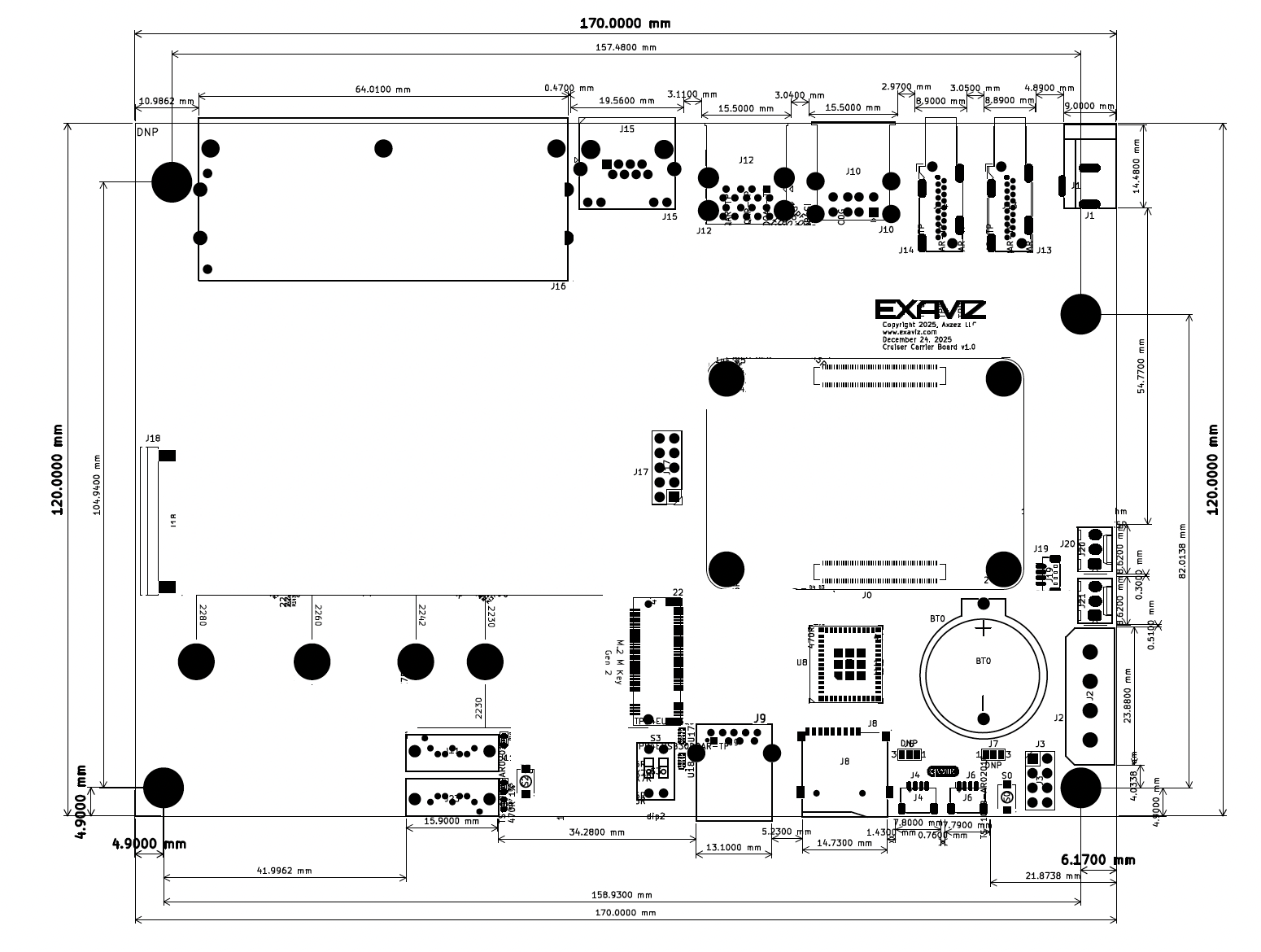
| Model | Price* | 1GbE Switch Ports | PoE Support | Best For |
|---|---|---|---|---|
| Cruiser (Full) | $159 | 8 (2x4 stack) | PoE+ (30W/port) | NVR, PoE Switch |
| Cruiser Lite | $119 | 4 (2x2 stack) | PoE+ (30W/port) | Small installs |
| Cruiser Keel | $99 | 4 (2x2 stack) | None | Non-PoE builds |
Prices shown are MSRP. Visit the Exaviz Store for current pricing.
All variants include a 2.5GbE uplink, M.2 NVMe, SATA, USB, HDMI, and an ESP32 wireless module.
Which revision is which model: Cruiser v2.0 is available as the Full model only and replaces Cruiser v1.0 Full. Cruiser Lite and Cruiser Keel are v1.0 models only. There is no v2.0 Lite or v2.0 Keel.
Both board revisions are in use (v2.0 is the Full model only; Lite and Keel are v1.0). The size, mounting holes, Cruiser Desktop Case fit, CM5 support, ports and storage are the same. The differences:
| Cruiser v1.0 | Cruiser v2.0 | |
|---|---|---|
| Wireless module | ESP32-C6-MINI-1U | ESP32-C5-MINI-1U-N4 |
| WiFi | WiFi 6, 2.4 GHz | WiFi 6, 2.4 GHz and 5 GHz dual-band |
| Bluetooth | LE 5.3 | LE 6.0 |
| Antenna connector (on the ESP32 module) | ESP32-C6-MINI-1U: 3rd generation MHF III | ESP32-C5-MINI-1U: 4th generation MHF IV (MHF 4) |
| Exaviz Zigbee firmware | Yes | Not yet available |
| DC input | Barrel jack | Barrel jack with redesigned input power protection, including inrush current limiting |
MHF 4 (v2.0) and MHF III (v1.0) do not intermate. A pigtail bought for a v1.0 board will not fit a v2.0 board. See External Antenna.
Need a different configuration? Contact us at info@exaviz.com. We can customize Cruiser and Interceptor boards to meet your specific requirements.
| Feature | Cruiser | Interceptor v2.0 |
|---|---|---|
| CM Support | CM5 only | CM4, CM5, BPi CM4 |
| 1GbE Switch | 4-8 ports (model dependent) | 4 ports |
| Built-in PoE | Up to 8 ports (model dependent) | 0 (add via PoE Board) |
| Uplink Speed | 2.5 GbE | 1 GbE (via 4-port switch) |
| NVMe | Yes (M.2) | No |
| SATA Ports | 2 | 5 |
| Wireless | WiFi 6/BLE/Zigbee | None |
| Power Input | 48-57V DC barrel (PoE) / 13-57V (Keel)* | 24-pin ATX |
| Best For | NVR, Edge AI, OT | NAS, Storage Server |
*48V minimum for PoE models; Keel (non-PoE) can use 13V+
Initial setup, requirements, and first boot. Get Started →
Connector reference, pinouts, and board layout. View Hardware →
Complete technical specifications. View Specs →
WiFi, PoE control, storage setup, and configuration. View Software →
Frequently asked questions. View FAQ →
Initial setup and first boot for the Cruiser Carrier Board.
Complete technical specifications for the Cruiser Carrier Board.
Connector reference, pinouts, and hardware details for the Cruiser Carrier Board.
WiFi, Bluetooth, and Zigbee configuration for the Cruiser’s built-in ESP32 module: ESP32-C6 on v1.0 boards, ESP32-C5 on v2.0.
Software setup, configuration, and usage for the Cruiser Carrier Board.
Use the Cruiser as a Zigbee coordinator for Home Assistant: what it needs, how to install it, how to pair devices, and what to check when it misbehaves.
Update the ESP32-C6 PoE firmware on your Cruiser v1.0 with exaviz-flash.
Performance benchmarks for the Cruiser Carrier Board including network and storage.
Typical power consumption for Cruiser board configurations.
Calculate the right power supply for your Cruiser configuration.
How to find your Cruiser board’s serial number, and what to send us if you cannot.
Common issues and solutions for the Cruiser Carrier Board
Frequently asked questions about the Cruiser Carrier Board.
Last modified November 24, 2026